A Complete Step-by-Step Explanation for Buyers, Landowners, Realtors, and Investors
The Telangana Government has transformed the way citizens access land and property-related services by offering a variety of digital platforms such as IGRS Telangana, Bhu Bharati (new portal replacing Dharani in 2025), and MeeSeva centres. Today, crucial documents like the Encumbrance Certificate (EC), Certified Copy, Property Registration records, Market Value, Stamp Duty calculations, and E-Stamp certificates can all be accessed online—saving time, effort, and long queues at Sub-Registrar Offices.
Whether you are planning to buy a plot, check land details, apply for a home loan, or verify property ownership, this extended guide will walk you through everything in the simplest way possible.
📑 Table of Contents
- Introduction to EC Telangana
- What is the Encumbrance Certificate (EC)?
- Why EC is important for buyers and banks
- Online platforms for getting EC in Telangana
- Step-by-step guide: How to get EC online via IGRS
- Step-by-step guide: How to get EC via Bhu Bharati (new portal)
- EC fees in Telangana
- How to pay E-Challan online
- How to generate E-Stamp
- Understanding IGRS Telangana portal in detail
- Property registration process explained
- Dharani & Bhu Bharati for agricultural lands
- Documents required for EC & registration
- Common issues and solutions
- Helpline & support
- FAQs
- Conclusion
1. Introduction: Why EC Telangana Matters Today
When buying a property—whether it’s a plot near Hyderabad, an apartment in Warangal, a farmhouse near Chevella, or agricultural land anywhere in Telangana—one document determines whether the land is clean, safe, and legally transferable: the Encumbrance Certificate (EC).
The Telangana Registration Department has now made it extremely simple to check EC online through:
- IGRS Telangana Portal (for most non-agricultural property & old records)
- Bhu Bharati Portal (for agricultural land EC from 2025 onwards)
- MeeSeva centres (for offline certified copies)
This guide explains everything step-by-step, using clear Indian English, so that anyone—from students to NRIs—can understand the process.
2. What is an Encumbrance Certificate (EC)?
An Encumbrance Certificate (EC) is an official legal document issued by the Sub-Registrar Office (SRO) that tells you:
✔ Whether the property has any legal dues
✔ Whether it was sold previously
✔ Whether any mortgages, loans, or court attachments exist
✔ Who the actual owner is
✔ If the title is clean for buying or selling
EC shows all registered transactions such as:
- Sale Deeds
- Gift Deeds
- Mortgage/Loan Deeds
- Release Deeds
- Partition Deeds
- Court Attachments
- Cancellations
If no transactions exist, the certificate will display “Nil Encumbrance Certificate” – meaning the property has no encumbrances.
3. Why EC is Important in Telangana Real Estate
Whether you are planning to buy plots in Hyderabad outskirts, villas in Shadnagar, flats in Gachibowli, or farmland in Nalgonda, EC is absolutely essential.
✔ 1. Proof of Ownership
EC confirms who the real owner of the property is.
✔ 2. Home Loan Eligibility
Banks like SBI, HDFC, ICICI, Axis, LIC Housing Finance demand EC before approving a loan.
✔ 3. Avoiding Fraud
EC helps ensure the property hasn’t been double-sold or mortgaged secretly.
✔ 4. Safe Investment
Before you invest your hard-earned money, EC tells you if the title is clean.
✔ 5. Checking Legal Disputes
Court orders, attachments, and pending cases may appear in EC.
4. Online Platforms for Getting EC in Telangana
As of 2025, these are the official platforms:
A. IGRS Telangana Portal
🔗 https://registration.telangana.gov.in
Best for:
- Apartments
- Non-agricultural plots
- Old registrations
- Certified copies of sale deeds
- Stamp duty & E-Challan
B. Bhu Bharati Portal (New – Replaced Dharani)
🔗 bhubharati.telangana.gov.in
Best for:
- Agricultural lands
- New EC records after 2018
- Land mutation, Pahani, ROR 1B
- Survey details
C. MeeSeva Centres
Best for:
- Offline certified EC
- Older properties (before 1980)
- Manual records not digitized
5. How to Get Encumbrance Certificate (EC) Online via IGRS Telangana
Follow these exact steps:
Step 1: Visit the Official Portal
Go to IGRS Telangana → Encumbrance Search (EC) and select citizen in user type. Next click on register and enter your details to register. Then login using your email/mobile and password.
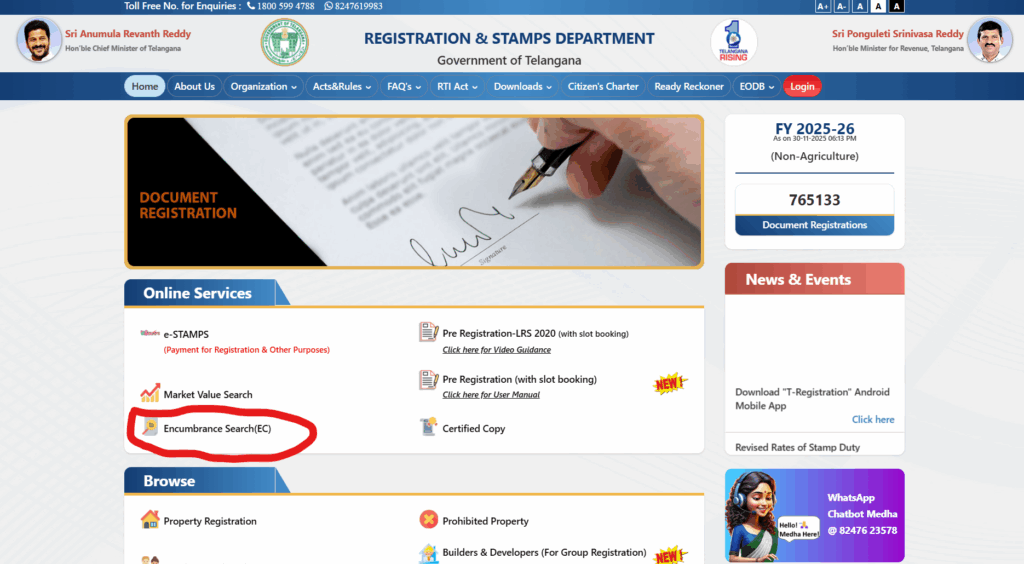
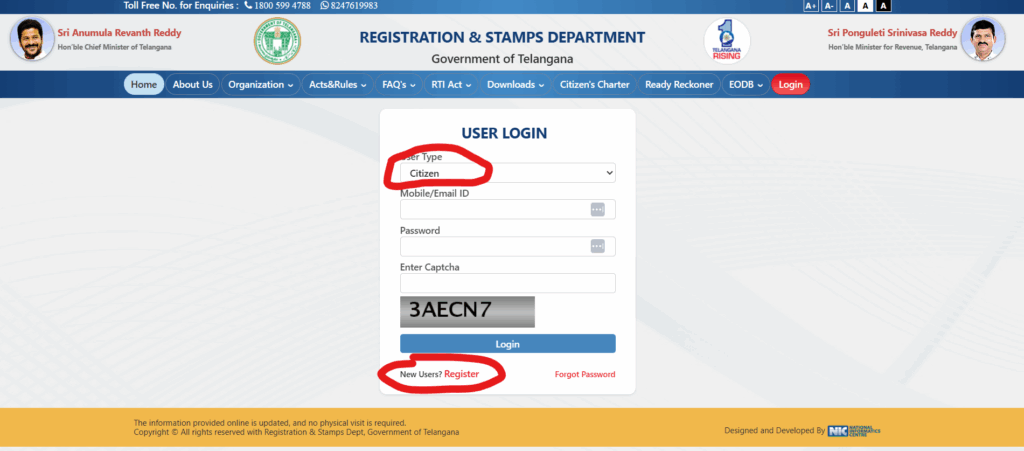
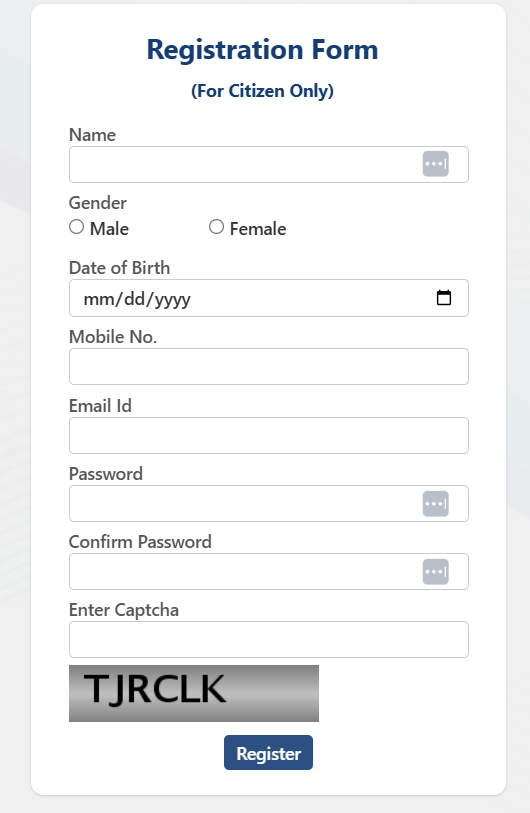
After login choose EC option:
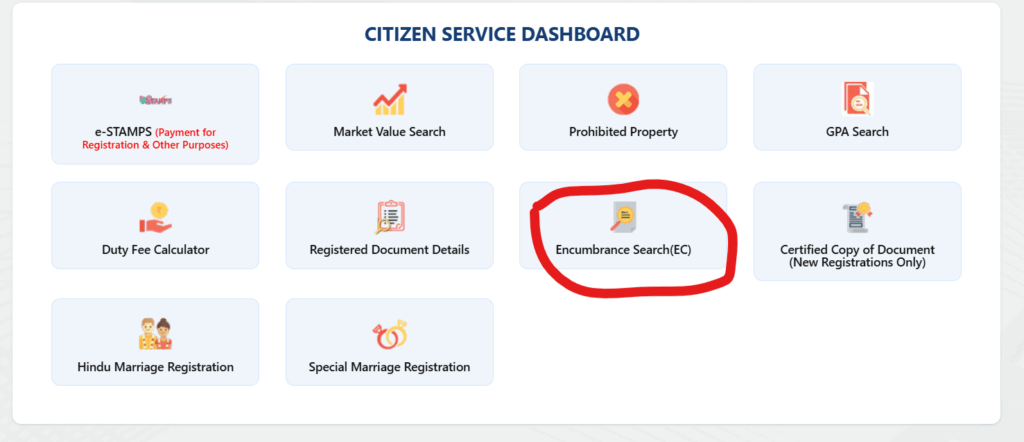
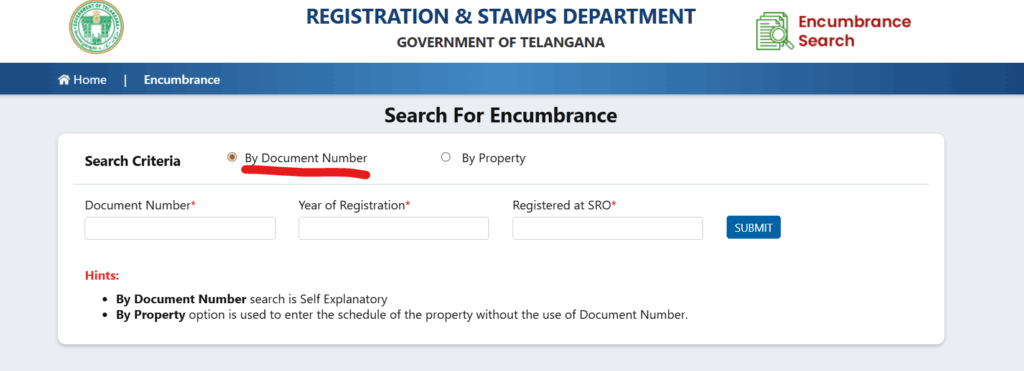
Step 2: Choose Search Type
You can search in two ways:
1. By Document Number – if you know document number, year of registration & SRO.
2.By Property Details – village, survey number/ plot number.
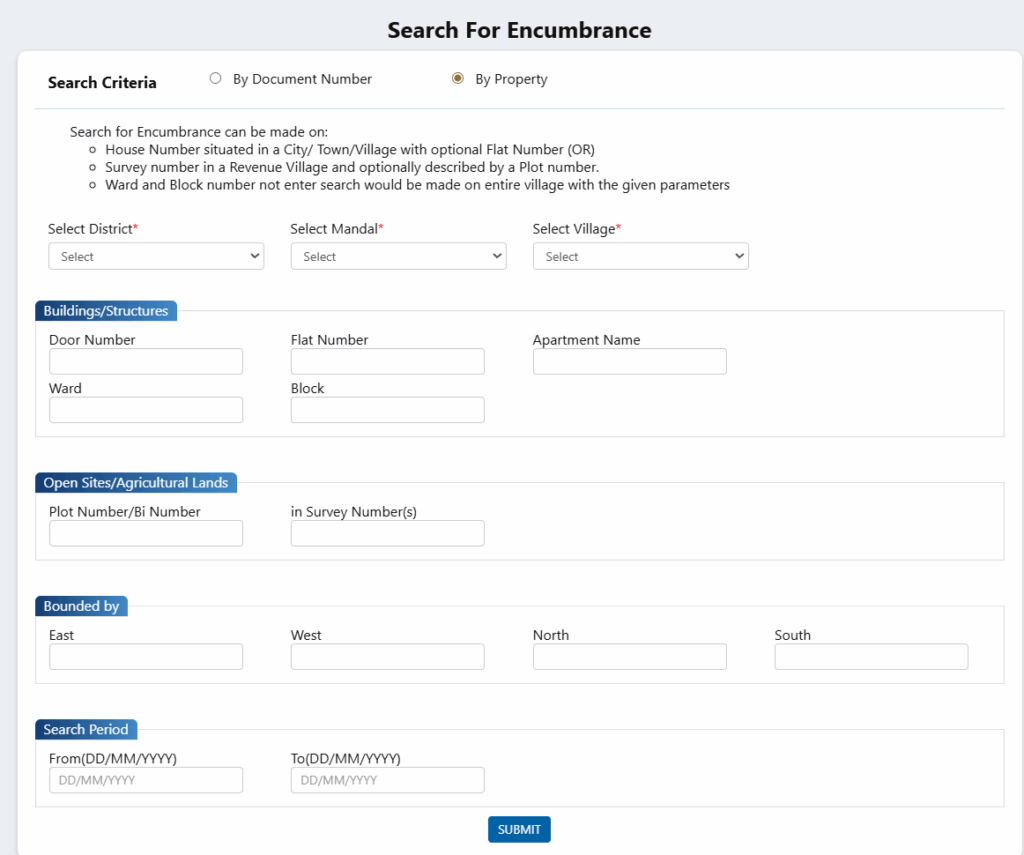
Step 3: Enter Details
- District, Mandal
- Village/SRO
- Survey No./House No./Document No.
- Boundaries
- Search period (e.g., 1990–2025)
Step 4: Submit the Request
Enter captcha and click Submit.
Step 5: Download EC PDF
The EC PDF will show all linked transactions.
This version is widely accepted by banks, financial institutions, and property buyers.
6. How to Get EC via Bhu Bharati Portal
This is the new portal replacing Dharani from 2025 onwards.
Step-by-Step Process
- Visit bhubharati.telangana.gov.in
- Login with mobile number (or use guest access if allowed)
- Go to Land Records → Encumbrance Certificate
- Enter:
- District
- Mandal
- Village
- Survey Number
- District
- Click Fetch Details
- Download the EC PDF
Bhu Bharati connects directly to GIS-based land maps and gives highly accurate land ownership data.
7. EC Fees in Telangana (2025)
| Type of EC | Fee |
| EC up to 30 years | ₹200 |
| EC above 30 years | ₹500 |
| Service Charge | ₹25 |
Online EC search (view mode) is free, but downloading the official version has a small fee.
8. E-Challan Payment on IGRS Telangana
This service simplifies paying:
- Stamp Duty
- Registration Charges
- EC Fees
How to Pay E-Challan:
- Visit IGRS → E-Challan (Pay Now)
- Choose payment type (Registration/Stamp Duty)
- Enter property value & details
- Pay using card/net banking/UPI
- Download challan receipt
9. E-Stamp Facility on IGRS Telangana
E-Stamp is used for registering:
- Sale deeds
- Lease deeds
- Gift deeds
- Mortgage deeds
How to Generate E-Stamp:
- Open IGRS Portal → E-Stamp
- Enter document type & property details
- Enter market value
- Pay online
- Download the e-stamp certificate
This makes physical stamp paper unnecessary.
10. Understanding IGRS Telangana Portal
IGRS = Integrated Grievance Redressal System
It acts as a single window platform for all property-related services.
Services Available:
- Encumbrance Certificate search
- Certified copies of documents
- Slot booking for registration
- Market value estimation
- Prohibited land list
- Stamp duty calculation
- E-Stamp
- E-Challan
- Marriage registrations
- Firm registrations
You can create an account using just your mobile number + OTP, upload documents, and make payments online.
11. Property Registration Process (Made Simple)
Before Going to SRO Office:
- Create account on IGRS portal
- Upload all required documents
- Pay Stamp Duty & Registration Fees
- Book a slot at SRO
Documents Required:
- Aadhaar (buyer & seller)
- PAN (if value > ₹10 lakh)
- Sale deed draft
- Encumbrance Certificate
- Property tax receipts
- Pattadar passbook (for agriculture land)
- Passport size photos
At the Sub-Registrar Office:
- Biometric verification (E-KYC)
- Document verification
- Payment confirmation
- Endorsements printed
- Registered document issued
Digital registration saves time and improves transparency.
12. Dharani & Bhu Bharati for Agricultural Lands
Dharani was used earlier but replaced by Bhu Bharati in 2025.
Bhu Bharati Services Include:
- Mutation (sale/gift/inheritance)
- EC for agricultural lands
- Survey records
- Pahani & ROR 1B download
- Pattadar passbook
- Land classification and mapping
GIS maps ensure accurate boundaries and ownership history.
13. Required Documents for EC & Registration
For Encumbrance Certificate:
- Survey number or Document number
- Aadhaar card
- Property address
- Sale deed copy
- Application form (online or MeeSeva)
For Property Registration:
- Original sale deed
- Previous EC
- Tax receipts
- ID proofs
- PAN
- Photographs
- Passbook (for agricultural land)
14. Common Issues & Solutions
❌ Property Not Found in EC Search
✔ Check correct SRO
✔ Try extended search years
✔ Visit SRO for very old records
❌ EC shows wrong name/details
✔ Apply for correction at SRO
❌ Online payment fails
✔ Try different browser
✔ Clear cache
✔ Try after few minutes
❌ Document not uploading
✔ Compress file
✔ Use PDF
✔ Upload during non-peak hours
15. Helpline Information
✔ Toll-Free: 1800-599-4788
✔ Email: igrs-support@telangana.gov.in
✔ Visit: Nearby Sub-Registrar Office
16. Frequently Asked Questions (FAQs)
1. What is an Encumbrance Certificate?
A document showing all registered transactions related to a property.
2. What’s included in an EC?
- Owner name
- Survey number
- Transaction history
- Document numbers
- Boundaries
3. Difference between Dharani EC and IGRS EC?
- Dharani/Bhu Bharati: Agricultural land records
- IGRS: Urban & non-agricultural properties
4. Is EC reliable for old properties?
For documents before 1980, apply for Certified EC at SRO.
5. What is Certified EC?
A legally stamped EC issued physically by SRO, considered more authentic.
6. Can Certified EC be obtained online?
No, only at SRO.
7. Does EC guarantee ownership?
No. It only shows registered transactions—not unregistered claims.
17. Conclusion
The Encumbrance Certificate (EC) is one of the most important documents for ensuring the legal safety of a property in Telangana. With modern platforms like IGRS Telangana and Bhu Bharati, accessing EC, land records, and registration services has become more transparent and extremely user-friendly.
Before investing in any plot, apartment, or agricultural land, always:
✔ Download EC
✔ Verify ownership
✔ Check survey details
✔ Cross-check in SRO if needed
This simple step can save you from future disputes, fraud, or financial loss.